01 / Pick your project
Folders first.
Open a folder, return to a known project and find its conversations. Search across conversations, including those in other projects.
 Kitty
Kitty
Windows desktop · Prototype snapshot
Meet Kitty. A desktop home for Claude Code and Codex, with projects, conversations and model choices together.
This showcase describes source commit 8768624, not a current release announcement.
Hello, Kitty
Room for the work
The inspected prototype brings the everyday coding-agent workflow into a desktop interface.
01 / Pick your project
Open a folder, return to a known project and find its conversations. Search across conversations, including those in other projects.
02 / Choose your model
Choose a Claude Code or Codex model from the connected CLIs. The picker includes favourites, a custom model ID and reasoning effort where reported.
A conversation keeps its vendor once started. Use a new conversation to switch vendors.
03 / Follow the turn
Replies stream into the transcript. Tool activity appears as work runs; approval prompts let you allow or deny a requested action.
The prototype also supports cancelling a turn and reopening saved conversations.
From folder to first turn
Use an installed, signed-in CLI through Kitty’s desktop interface.
Check the prerequisites ↓Kitty’s Agents settings show detected CLI availability. Rescan after installing or signing in.
Choose the folder for your work, then start a new conversation.
Select a model from an available agent, choose supported effort settings and write your message.
Read streamed replies and tool activity, answer approvals and return to the saved conversation later.
Make yourself at home
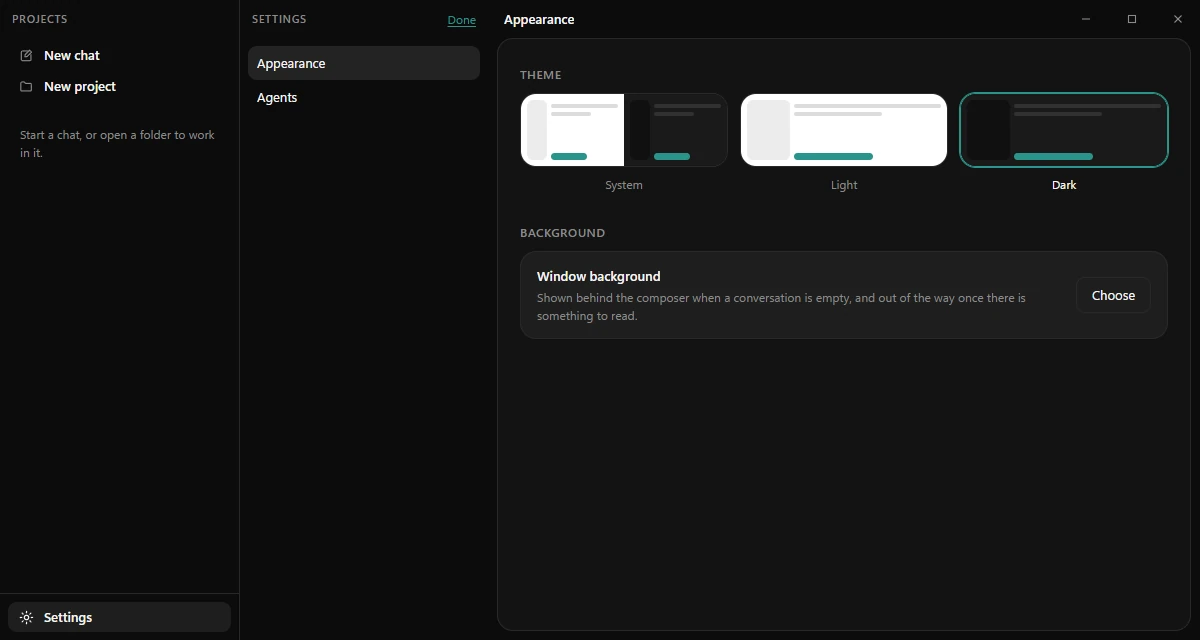
Follow the system theme, choose light or dark, or pick a background image. The background appears behind the composer when a conversation is empty.
The snapshot also includes adjustable project and conversation rails, plus saved window zoom.
Inspect appearance controls ↗The screenshot above shows these appearance settings in the actual app. Its native host was mocked for capture; the colourful surfaces on this website are showcase styling.
A few things first
This snapshot targets Windows. Its Tauri desktop shell uses WebView2; the installer configuration includes a runtime bootstrapper.
Have Claude Code or Codex installed and signed in through its own CLI. The prototype is designed around subscription authentication. Available models depend on what the CLI reports.
These details describe commit 8768624. The repository’s prototype notes record implemented slices and development checks. Check the project for newer instructions and status; this page makes no claim about current release availability.
Small print, clear sources
App descriptions are grounded in the owner’s official repository at commit 8768624: prototype scope and recorded status, model picker, conversation search, settings and Windows bundle configuration.
The approved black-and-white logo and favicon are copied unchanged from the official master and its official raster derivative at branding commit cf21210, identified in the project's release guidance. The screenshot was captured on 1 October 2026 with Tauri’s host mocks, empty lists and no connected agents. No conversation or agent output was fabricated.

